Bi-SQUID Single Run Simulation
Input Text File Preparation
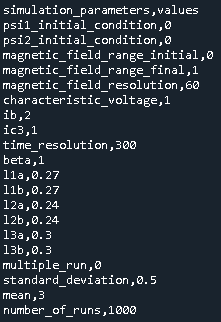
Firstly, we should prepare input text file for our simulation goals. Input csv file content is shown in below for this tutorial. Input csv file represents circuit and simulation parameters. Download link for this input csv file: https://github.com/aakgn/PySQIF/blob/main/docs/tutorial_resources/bi-squid_single_run.csv
Running Simulation
Secondly, we should import and initialize our PySQIF library as shown in below. Prepared input csv file should be placed at Python working directory.
from PySQIF.Main import Main as pysqif
voltage_response = pysqif("bi-squid_single_run.csv")
We imported and constructed our library. Finally, we can calculate voltage response of our circuit by using calculate method.
voltage_response = voltage_response.calculate("bi-squid_single_run.csv")
When simulation time is done, two output file appears in the current working folder. First of them is output_voltage.csv, this csv fiel consists voltage response of our circuit in defined normalized extetrnal magnetic flux range.
Second output file is output_normalized_magnetic_flux.csv, this file consists normalized external magnetic flux array in defined range.
Visualization
Finally, we can visualize our results by using PySQIF Plot module. As we did before firstly, we should import and construct our Plot module ,and then we can plot our results by using the plot method.
from PySQIF.Plot import Plot as plt
plot = plt(voltage_response)
plot.plot(voltage_response)
Figure shows output visualization below:
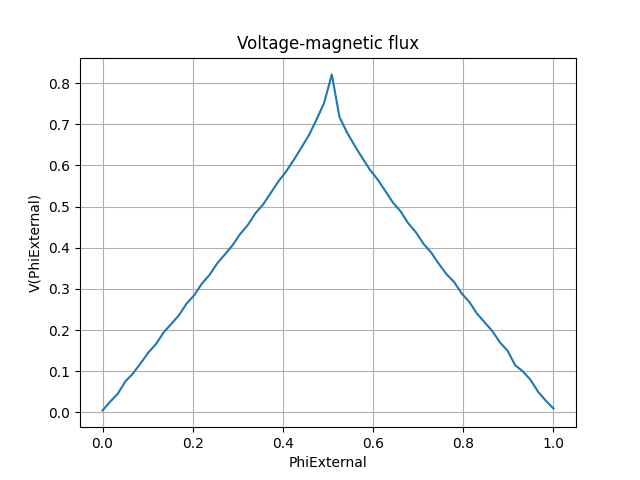
Figure shows Bi-SQUID external applied magnetic field response. Voltage response is represented as normalized average voltage response.